A well-designed swivel chair can reduce fatigue, support healthier posture, and keep movement effortless through long work sessions. The difference between “fine for an hour” and “comfortable all day” usually comes down to adjustability, lumbar alignment, seat dimensions, and how the chair’s materials and base hold up over time. If your workday includes frequent reaching, turning between screens, or switching from typing to calls, a stable swivel and controlled recline can make your setup feel smoother and less taxing.
What Makes a Swivel Chair Feel Ergonomic
Ergonomics isn’t one single feature—it’s how multiple adjustments work together to fit your body and tasks.
- Adjustability as the foundation: Seat height, recline and tilt tension, armrests, and lumbar support should adapt to different bodies and workflows (typing, meetings, reading, design work).
- Dynamic sitting: A stable recline plus smooth swivel encourages small posture changes. Those micro-movements can help reduce stiffness compared to staying locked in one position.
- Pressure management: A supportive seat should feel “even,” without sharp pressure at the thighs, hips, or tailbone—especially after 60–90 minutes.
- Back support that follows your shape: Lumbar support should meet the natural inward curve of the lower back, not flatten it or push you forward.
For practical guidance on workstation comfort and reducing strain, consult resources such as OSHA’s Computer Workstations eTool and NIOSH ergonomics guidance.
Key Features to Look For Before Buying
Before choosing a chair, confirm it can be tuned to your body and your desk—not the other way around.
- Seat height range: Feet should rest flat while knees stay near a 90° angle (or slightly open), without your hips feeling “tucked.”
- Seat depth and width: You should be able to sit back with the backrest supporting you while leaving about 1–3 fingers of space behind the knees.
- Lumbar support: Adjustable height/depth is ideal. If it’s fixed, it should still land in the lower-back curve rather than the mid-back.
- Backrest and recline: Look for multiple recline positions and adjustable tilt tension so leaning feels controlled instead of abrupt.
- Armrests: Height adjustment is the minimum. Width and pivot help keep shoulders relaxed and elbows closer to your sides.
- Swivel and base: A stable 5-star base and smooth rotation make it easier to reach without twisting your spine.
- Casters: Match casters to your floor (hard-floor casters for hardwood/vinyl; appropriate casters or a mat for carpet) to protect surfaces and prevent “stuck” rolling that can lead to awkward pushing.
- Breathability and padding: Aim for airflow plus cushioning that retains shape. Overly soft foam can feel nice initially but may compress and create pressure points later.
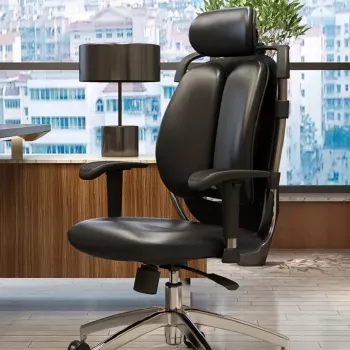
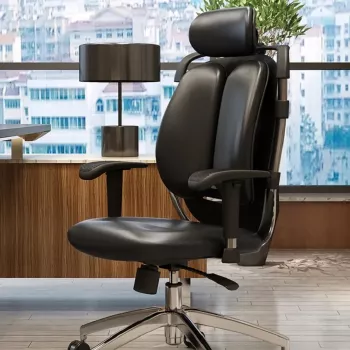
If you want a seating option designed around these essentials, consider the Ergonomic Swivel Office Chair for a work-focused setup where adjustability and everyday support matter.
Sizing and Fit Checklist
Fit issues often show up as shrugged shoulders, wrist strain, or legs that feel cramped. A few quick checks can prevent that.
- Measure desk height: Compare it to the chair’s seat height range so your forearms can stay comfortable while typing.
- Confirm armrest clearance: Armrests should slide under the desk when you pull in (or choose removable/flip-up arms if your desk is tight).
- Petite or tall needs: Prioritize wider adjustment ranges and, if possible, seat depth options so you’re not forced into a “perch” or a slouch.
- Weight capacity and stability: A sturdy base and appropriate capacity help keep performance consistent over years of use.
Quick Fit Guide for Everyday Desk Work
| Body/Desk Check |
Good Sign |
Adjustment to Use |
| Feet on the floor |
Heels stay down without effort |
Raise/lower seat height |
| Knee position |
Knees near hip level; no thigh pressure |
Adjust seat height and seat depth (if available) |
| Lower back support |
Lumbar fills the curve without pushing you forward |
Adjust lumbar height/depth or backrest position |
| Shoulders and neck |
Shoulders relaxed; head not jutting forward |
Adjust armrests and recline/tension |
| Arm position at keyboard |
Elbows near 90°; wrists neutral |
Adjust armrest height/width; bring chair closer |
| Reach to mouse/desk items |
Minimal twisting; easy rotation |
Use swivel + reposition frequently used items |
Set-Up Tips for Better Posture in Minutes
Small adjustments can change how your whole day feels—especially if you alternate between focused work and calls.
For performance and safety benchmarks in commercial seating, BIFMA standards are a useful reference point when comparing chair build quality and durability expectations.
Care, Maintenance, and Longevity
Comfort Add-Ons That Improve a Desk Setup
- Keep frequently used gear within reach: Reducing repeated twisting helps shoulders and upper back stay calmer throughout the day.
- Upgrade audio placement: A dedicated mic positioned correctly can reduce the tendency to lean forward during calls or recordings. Consider the Professional Dynamic Microphone for Streaming, Podcasting & Studio Recording for a tidy, desk-friendly setup.
- Support reading and note-taking: Better lighting and a document stand can reduce forward head posture and neck tension.
FAQ
How high should an office chair be set?
Set the seat so your feet rest flat on the floor, your knees are around a right angle, and your thighs feel supported without pressure behind the knees.
Is lumbar support necessary for a swivel office chair?
Lumbar support helps maintain the natural curve of your lower back during longer sitting periods. Adjustable lumbar is ideal, but a well-shaped backrest can also work if it aligns with your lower back correctly.
What type of casters are best for hardwood floors?
Use soft or hard-floor-rated casters designed to roll smoothly without scratching. A quality chair mat can also help protect the surface while keeping movement effortless.
Recommended for you











Leave a comment